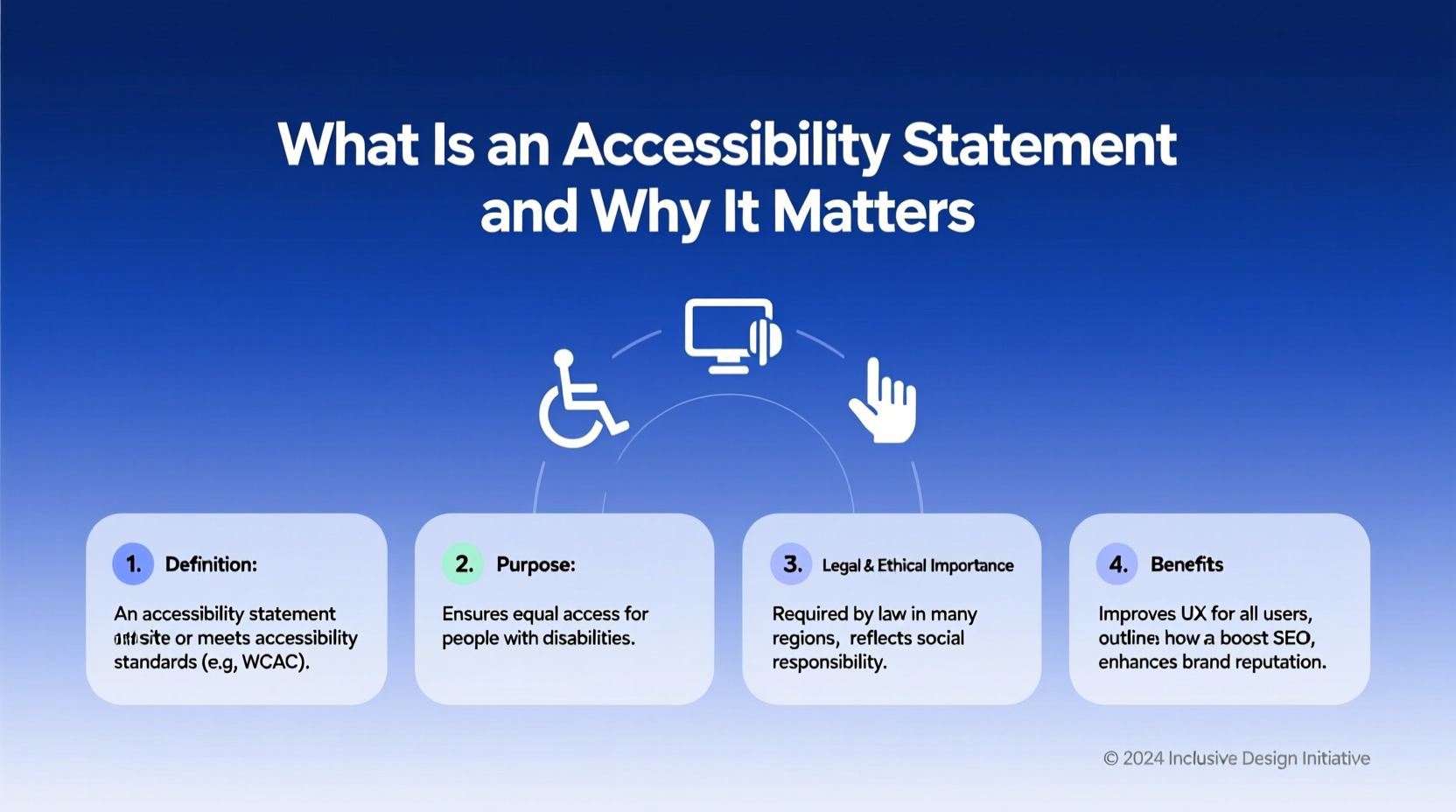
An accessibility statement for websites is a formal declaration that outlines how digital content complies with accessibility standards, ensuring people with disabilities can navigate, understand, and interact with online platforms. This document not only demonstrates legal compliance—such as adherence to the Americans with Disabilities Act (ADA), Web Content Accessibility Guidelines (WCAG) 2.1, and the European Accessibility Act—but also reflects a brand’s commitment to inclusivity. Whether you're a small business owner, nonprofit organization, or large corporation operating in the U.S., EU, or Canada, having a clear, publicly available accessibility statement builds trust, reduces legal risk, and improves user experience for millions of users with visual, auditory, motor, or cognitive impairments.
Understanding the Purpose of an Accessibility Statement
An accessibility statement serves multiple functions: it informs users about the current level of web accessibility, details ongoing efforts to improve access, and provides contact methods for reporting barriers. Unlike generic 'we care about accessibility' messages, a well-crafted statement includes measurable commitments, conformance levels (e.g., WCAG 2.1 Level AA), known limitations, and alternative ways to access services if full digital access isn't yet possible.
The primary goal is transparency. Users with disabilities need to know whether they can effectively use your site before investing time trying. For organizations, it's both a proactive compliance tool and a public relations asset. In recent years, lawsuits related to inaccessible websites have surged, particularly under Title III of the ADA. Courts increasingly recognize websites as 'places of public accommodation,' making accessibility statements not just ethical but essential for legal protection.
Legal Requirements and Regional Differences
While there is no single global law mandating accessibility statements, several regions require them based on local legislation:
- United States: The ADA does not explicitly require an accessibility statement, but courts interpret ADA Title III as applying to websites. Federal agencies must comply with Section 508 Refresh, which mandates conformance with WCAG 2.0 Level AA. Many private companies adopt similar standards and publish statements to demonstrate good faith efforts.
- European Union: Under the Web Accessibility Directive (for public sector) and the broader European Accessibility Act (EAA), effective June 28, 2025, all public sector websites and mobile apps must have an accessibility statement. Private businesses providing essential services (e.g., banking, e-commerce, transport) will also be affected starting 2025.
- Canada: The Accessible Canada Act (ACA) requires federally regulated organizations to publish accessibility plans and progress reports. While not identical to a web-focused statement, these documents serve a similar purpose.
- Australia: Complies with the Disability Discrimination Act 1992 and recommends WCAG 2.1 Level AA. Australian government sites are required to display accessibility statements.
These variations mean that organizations serving international audiences should tailor their statements to reflect applicable laws. A U.S.-based company selling globally may choose to align with EU standards to ensure broad compliance.
Key Components of a Strong Accessibility Statement
To be effective, an accessibility statement should include the following elements:
- Commitment Statement: A clear declaration of your organization’s dedication to accessibility.
- Standards Followed: Specify which guidelines you follow (e.g., WCAG 2.1 at Level AA).
- Conformance Status: Indicate whether your site fully conforms, partially conforms, or is working toward compliance.
- Known Limitations: List any non-accessible content (e.g., legacy PDFs, third-party widgets) and explain why.
- Alternative Access Options: Provide contact information so users can request accessible formats (e.g., Braille, large print, audio versions).
- Feedback Mechanism: Include a way for users to report issues (email, form, phone).
- Assessment Methods: Describe how accessibility was evaluated (automated tools, manual testing, user feedback).
- Date of Last Update: Show when the statement was last reviewed or revised.
- Ongoing Efforts: Outline future improvements and timelines.
Avoid vague language like “we strive to be accessible” without supporting details. Instead, say: “Our website aims to conform to WCAG 2.1 Level AA. We conduct quarterly audits using WAVE and screen reader testing with NVDA and JAWS.” Specificity increases credibility.
| Component | Description | Example |
|---|---|---|
| Commitment | Organization's pledge to accessibility | "We are committed to ensuring digital accessibility for all users." |
| Standards | Guidelines followed | "WCAG 2.1 Level AA" |
| Conformance | Status of compliance | "Partially conformant with exceptions noted" |
| Limitations | Non-accessible content | "Some older PDFs lack tags and alt text" |
| Contact Info | How to report issues | "Email accessibility@company.com" |
Common Misconceptions About Accessibility Statements
Several myths persist about what accessibility statements do—and don’t—do:
- Misconception 1: Publishing a statement guarantees legal immunity.
Reality: A statement alone doesn’t protect against lawsuits. Actual accessibility implementation matters more. However, a detailed, honest statement shows effort and can reduce penalties. - Misconception 2: Only government sites need them.
Reality: While mandatory for EU public bodies, private companies face increasing pressure from regulators and consumers to provide transparency. - Misconception 3: Automated tools make my site accessible.
Reality: Tools like WAVE or axe help identify issues but cannot catch all problems (e.g., logical reading order, meaningful link text). Manual and user testing are critical. - Misconception 4: If I’m compliant today, I’ll stay compliant.
Reality: Websites evolve. New content, features, or design updates can introduce new barriers. Regular monitoring is essential.
How to Write an Effective Accessibility Statement
Follow these steps to create a credible and useful accessibility statement:
- Audit Your Website: Use automated tools (e.g., Lighthouse, WAVE) combined with manual checks (keyboard navigation, screen reader tests) to assess current accessibility.
- Identify Gaps: Document areas failing WCAG criteria (e.g., missing form labels, low color contrast).
- Set Priorities: Address critical issues first (e.g., keyboard traps, missing headings).
- Draft the Statement: Use plain language. Avoid technical jargon unless explained.
- Include Contact Channels: Offer multiple ways to reach your team (email, phone, contact form).
- Review by Stakeholders: Involve people with disabilities in reviewing the draft for authenticity.
- Publish Publicly: Link the statement in your website footer for easy access.
- Update Regularly: Reassess every 6–12 months or after major site changes.
Many organizations use templates from trusted sources like the W3C, GOV.UK, orDeque University. However, avoid copying verbatim—customize the content to reflect your actual practices and challenges.
Tips for Maintaining Ongoing Compliance
Creating a statement is just the beginning. Long-term success depends on continuous improvement:
- Train Your Team: Educate developers, designers, and content creators on accessibility best practices.
- Integrate into Development: Make accessibility part of your design system and QA process.
- Monitor Third-Party Content: Plugins, embedded videos, and social media feeds can break accessibility—review them regularly.
- Engage Disabled Users: Partner with disability advocacy groups or hire consultants with lived experience.
- Track Progress: Set measurable goals (e.g., fix 20% of issues per quarter) and report progress annually.
Where to Place Your Accessibility Statement
The most common and effective location is the website footer, alongside links to Privacy Policy, Terms of Service, and Contact Us. This ensures visibility across all pages. Some organizations also link it in the main navigation menu or within a dedicated 'Accessibility' section.
Best practice: Use clear anchor text like “Accessibility Statement” rather than vague terms like “Help” or “Info.” Avoid hiding it behind multiple clicks. Search engines index these pages, so proper HTML structure (headings, semantic markup) helps SEO and screen reader navigation.
SEO Benefits of an Accessibility Statement
Beyond compliance, publishing an accessibility statement can boost your search engine rankings. Google prioritizes user experience, and accessible websites tend to have better structured data, descriptive text, and mobile responsiveness—all ranking factors.
Additionally, including long-tail keywords naturally—such as “website accessibility statement example,” “how to write an accessibility policy,” or “WCAG 2.1 compliance statement”—can attract organic traffic from users seeking guidance. Internal linking from blog posts or support articles further strengthens SEO value.
Future Trends in Digital Accessibility
Expect stricter enforcement and broader requirements in the coming years. The proposed Online Accessibility Act in the U.S. could standardize web accessibility rules nationwide. Meanwhile, AI-powered assistive technologies (like voice navigation and real-time captioning) are raising user expectations.
Emerging standards like WCAG 2.2 (expected to become official in 2024) add new success criteria for mobile accessibility, cognitive disabilities, and focus indicators. Organizations should prepare by staying informed through resources like the W3C’s Web Accessibility Initiative (WAI) and partnering with accessibility experts.
Frequently Asked Questions (FAQs)
- Do small businesses need an accessibility statement?
- While not always legally required, small businesses benefit from publishing one to reduce legal risks and show inclusivity. If you serve customers online, accessibility affects usability for everyone—including aging populations and temporary injury sufferers.
- Is there a penalty for not having an accessibility statement?
- In the EU, public sector sites face fines for non-compliance. In the U.S., while no federal fine exists specifically for lacking a statement, inaccessible websites can lead to lawsuits under the ADA. Having a statement may demonstrate remediation intent and mitigate damages.
- Can I copy another company’s accessibility statement?
- No. Copying another organization’s statement is misleading and potentially fraudulent. Your statement must reflect your actual practices, technologies, and limitations. Use templates as guides, but customize thoroughly.
- How often should I update my accessibility statement?
- Review and update your statement at least annually or whenever significant changes occur to your website. Always note the date of the last revision to maintain transparency.
- Does an accessibility statement replace the need for audits?
- No. The statement summarizes your accessibility status, but regular audits using automated tools and human testers are necessary to verify compliance and uncover hidden issues.





 浙公网安备
33010002000092号
浙公网安备
33010002000092号 浙B2-20120091-4